Battlefield 1942: A Box of CDs, a Little Nostalgia, and Some Reverse Engineering
Posted on Fri 23 October 2026 in Retro Gaming
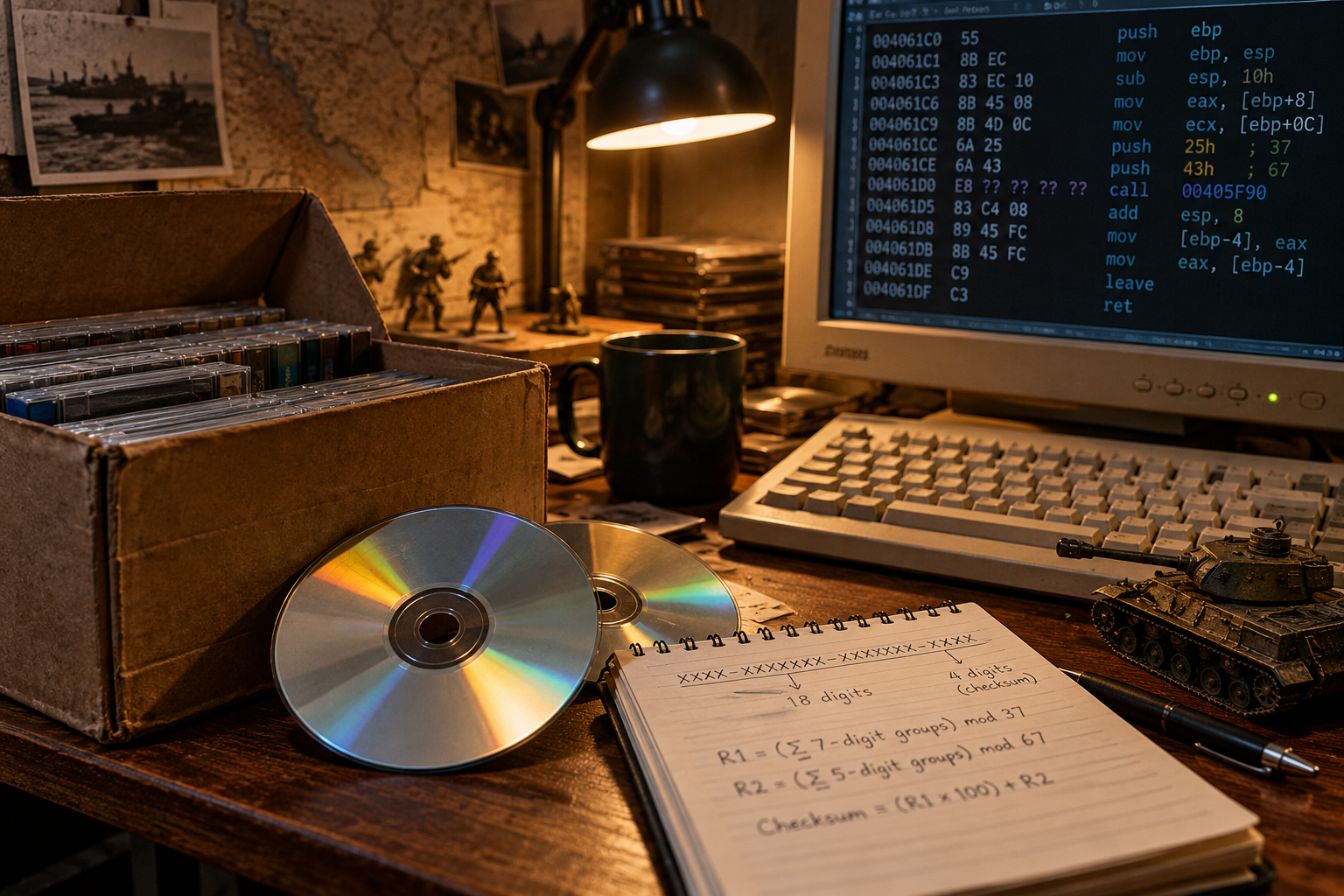
Original BlogByNuX illustration, generated for this article.
It all started one evening when my friend Smilly and I were talking.
“NuX, guess what I found in a box?”
— Smilly, completely unaware of the rabbit hole he was about to send me down
Turns out, he had stumbled across his original Battlefield 1942 installation discs.
Talk about a walk down memory lane!
If you were gaming back in the early 2000s, you probably remember Battlefield 1942. Long before everything was downloaded through Steam or another digital storefront, we had physical CDs, installation wizards, patches, and those wonderful little serial numbers printed somewhere inside the case.
And when something didn't install correctly? Well, good luck!
Anyway, our conversation got me thinking.
I normally don't condone piracy. I believe developers deserve to be compensated for their work. But what happens when a game is more than 20 years old, is no longer commercially available through normal channels, and the original installer doesn't even work properly on modern Windows?
Do we just let these old games disappear?
It Can't Be That Difficult, Right?
Smilly was kind enough to provide the installation files.
Not an ISO image of the original discs, mind you. He had put together a drag-and-drop ZIP archive, along with instructions explaining how he had managed to install the game.
Apparently, the original Battlefield 1942 installer had been throwing continuous installation errors.
His workaround?
Extract the contents of the original CAB files and put everything back into the correct directory structure.
That's it.
No magical compatibility layer. No elaborate virtual machine. Just extract the files and reconstruct the original installation directories.
You know those moments when somebody explains something so obvious that you slap yourself in the forehead and say:
“Well, why didn't I think of that?”
— Me, after hearing Smilly's CAB-file workaround
Yeah. This was one of those moments.
And then came the part where the :| emoji becomes appropriate.
Because getting the files onto the computer was only the beginning.
The CD-Key Problem
Smilly wasn't comfortable sharing his original CD key.
Fair enough.
Personally, after more than two decades, I doubt anyone is losing sleep over a Battlefield 1942 serial number. But it was his key, his decision, and I respected that.
Of course, the internet is full of old game serial numbers.
In fact, back when I was younger and dirt poor, I could probably have recited several of the websites where you could find them.
I'm not particularly proud of that, but I'm not going to pretend those days didn't happen, either.
This time, however, I wanted to approach the problem differently.
I've always been the kind of person who takes things apart just to figure out how they work.
Motors, sewing machines, toys, computers, mechanical equipment, networks... you name it.
Sometimes I'd even manage to put everything back together!
So rather than hunting around the internet for somebody else's CD key, I started wondering:
And that's where things got interesting.
Twenty Years Later, We Have Better Tools
Back when Battlefield 1942 was released in 2002, reverse-engineering software wasn't exactly something the average home computer user could easily jump into.
The tools existed, of course, but many were expensive, complicated, or required a fair amount of specialized knowledge.
Fast-forward more than 20 years, and there are excellent free tools available for examining executable files, disassembling machine instructions, and following the logic inside a program.
And it turns out that Battlefield 1942, along with several of the other early Battlefield games, included a small executable responsible for handling CD-key registration.
In the case of Battlefield 1942, that utility was called:
Battlefield 1942_Code.exe
Its job was relatively straightforward.
The program would accept a CD key, validate it, and, if accepted, write the appropriate registration information into the Windows Registry.
That got my attention.
Because if the program could determine whether a CD key was mathematically valid, somewhere inside that executable had to be the logic responsible for making that determination.
And if I could understand that logic, I could reproduce the calculation myself.
Not by guessing.
Not by downloading random serial numbers from some questionable website.
But by understanding the mathematics.
So I started taking the executable apart.
Here's what I found...
The Mathematics Behind a Battlefield 1942 CD Key
The first interesting discovery was that the reconstructed CD-key checksum routine wasn't using anything particularly exotic.
No SHA-256. No MD5. No complicated cryptographic hash.
Instead, it used relatively simple modular arithmetic.
A Battlefield 1942 CD key consists of 22 numeric digits arranged like this:
The first 18 digits serve as input to the checksum calculation. The final four digits contain the checksum itself.
Once the hyphens are removed, the calculation performs two separate operations.
The First Calculation: Modulo 37
Take the first 18 digits, add five zeros to the beginning and another five to the end.
This produces a 28-digit string.
Divide that string into four groups of seven digits, convert each group to a decimal number, and add them together.
Then divide the total by 37 and keep the remainder.
That remainder is our first result, which we'll call R1.
The Second Calculation: Modulo 67
Take the original 18 digits again, but this time append only two zeros.
That produces a 20-digit string.
Divide it into four groups of five digits, convert each group to a decimal number, and add them together.
Divide that total by 67 and keep the remainder.
That's our second result, R2.
Putting Everything Together
The final checksum is calculated using:
Format that result as four decimal digits, including leading zeros if necessary, and you've got the mathematical checksum.
That's the entire reconstructed formula.
One Example, Two Remainders
Here's how the checksum comes together using the example from the test data.
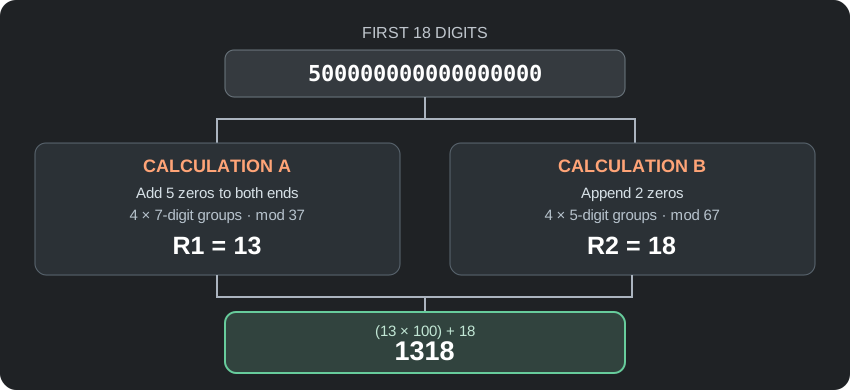
The two calculations are independent: one produces R1 = 13, the other produces R2 = 18. Combining them gives 1318.
Putting the Mathematics to the Test
To see whether the formula held up, I tested six numerical examples.
| Example CD key | R1 mod 37 | R2 mod 67 | Checksum | Result |
|---|---|---|---|---|
| 5000-0000000-0000000-1318 | 13 | 18 | 1318 | ✓ Match |
| 1283-5598944-5507485-0040 | 0 | 40 | 0040 | ✓ Match |
| 8549-4951996-4969681-2201 | 22 | 1 | 2201 | ✓ Match |
| 2823-4108811-1907415-0762 | 7 | 62 | 0762 | ✓ Match |
| 1608-7627313-7374942-1312 | 13 | 12 | 1312 | ✓ Match |
| 1181-6889007-6913833-3031 | 30 | 31 | 3031 | ✓ Match |
That was pretty satisfying.
Something that initially looked like an obscure serial-number verification routine had turned into a straightforward mathematical problem.
Better yet, it was something I could reproduce with a few lines of Python or C#.
And for someone who enjoys figuring out how things work, that's half the fun.
What Did We Actually Learn?
The reconstructed algorithm relies on two mathematical constants: 37 and 67.
By grouping the numbers, adding them together, calculating the remainders, and combining the results, we can reproduce the four-digit checksum.
The reverse-engineering notes identified a CD-key validation routine at 0x406350, a mathematical calculation routine at 0x4061C0, and the constants 37 and 67.
The six examples produced matching checksums, demonstrating that the mathematical calculation works consistently across the test data.
And that, by itself, is a pretty interesting little piece of gaming history.
Final Thoughts
What started as a conversation with an old friend about a dusty box of Battlefield 1942 CDs turned into a trip down memory lane, an installation troubleshooting exercise, and eventually a little reverse-engineering project.
I went into this wanting to play a game I hadn't touched in years.
Instead, I found myself investigating how software written more than two decades ago checked a string of numbers.
But that's how these projects usually go, isn't it?
You start by trying to solve one problem, discover something interesting along the way, and suddenly you're three rabbit holes deeper than you intended.
For me, preserving old software isn't just about nostalgia. It's also about understanding the technology, learning how things were built, and keeping a little bit of computing history alive.
And apparently, all it takes to get started is an old box of CDs and a friend named Smilly.
— NuX
Appendix: Reproducing the Checksum in Python
If you're curious about the math, here's the complete Python 3 example I used to reproduce the checksum calculation. It prints both remainders and compares the calculated four-digit suffix with the supplied one.
def calculate_checksum(prefix: str):
    if len(prefix) != 18 or not prefix.isascii() or not prefix.isdigit():
        raise ValueError("Input must contain exactly 18 ASCII digits.")

    # First calculation: 28 digits, split into four 7-digit groups.
    a = "00000" + prefix + "00000"
    a_groups = [int(a[i:i + 7]) for i in range(0, 28, 7)]
    r1 = sum(a_groups) % 37

    # Second calculation: 20 digits, split into four 5-digit groups.
    b = prefix + "00"
    b_groups = [int(b[i:i + 5]) for i in range(0, 20, 5)]
    r2 = sum(b_groups) % 67

    checksum = f"{r1 * 100 + r2:04d}"
    return r1, r2, checksum


def validate_key(key: str):
    digits = key.replace("-", "")

    if len(digits) != 22 or not digits.isascii() or not digits.isdigit():
        raise ValueError("Key must contain exactly 22 ASCII digits.")

    r1, r2, calculated = calculate_checksum(digits[:18])
    return r1, r2, calculated, calculated == digits[18:]


test_keys = [
    "5000-0000000-0000000-1318",
    "1283-5598944-5507485-0040",
    "8549-4951996-4969681-2201",
    "2823-4108811-1907415-0762",
    "1608-7627313-7374942-1312",
    "1181-6889007-6913833-3031",
]

for key in test_keys:
    r1, r2, checksum, matches = validate_key(key)
    print(
        f"{key} | R1={r1:02d} | R2={r2:02d} | "
        f"Checksum={checksum} | Match={matches}"
    )
Running the script prints the two remainders and Match=True for all six examples. The math checks out.